


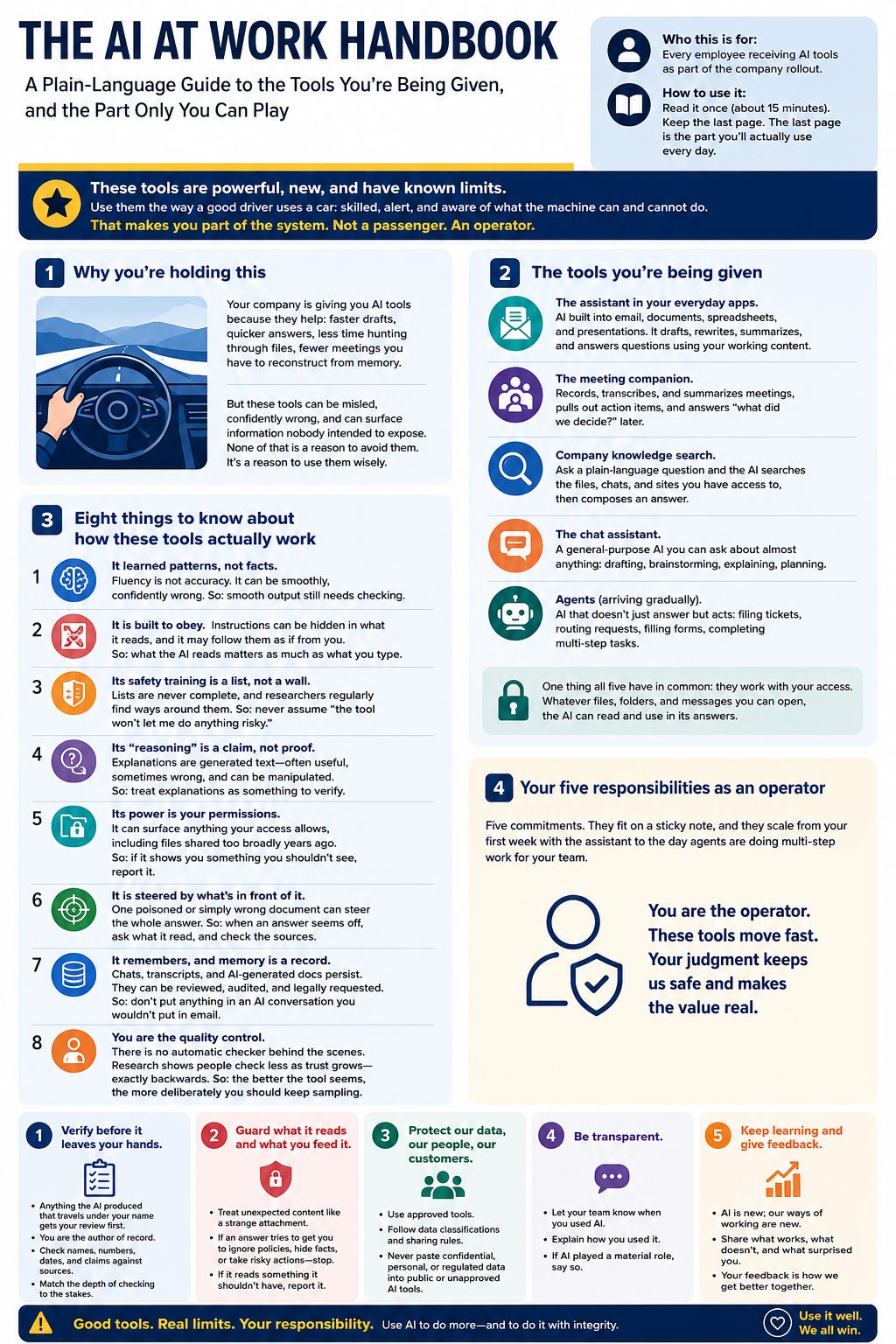
Who this is for: Every employee receiving AI tools as part of the company rollout. No technical background needed. How to use it: Read it once (about 15 minutes). Keep the last page. The last page is the part you’ll actually use every day.
1. Why you’re holding this
Your company is giving you a set of AI tools because they genuinely help: faster drafts, quicker answers, less time hunting through files, fewer meetings you have to reconstruct from memory. That part is real.
Here is the other part, and this handbook exists because most rollouts never say it plainly: these tools are powerful, they are new, and they have known limits that no vendor can fully fix. The research community has shown that AI systems of this kind can be misled by cleverly written text, can produce confident answers that are wrong, and can surface information nobody intended to expose. None of that is a reason to avoid the tools. It is a reason to use them the way a good driver uses a car: skilled, alert, and aware of what the machine can and cannot do.
That makes you part of the system. Not a passenger. An operator. This handbook covers the tools, how they actually work, and the specific responsibilities that come with your seat.
2. The tools you’re being given
Your exact lineup may vary by team and rollout phase, but most employees will see some combination of these:
The assistant in your everyday apps. AI built into email, documents, spreadsheets, and presentations. It drafts, rewrites, summarizes, and answers questions using your working content.
The meeting companion. Records, transcribes, and summarizes meetings, pulls out action items, and answers “what did we decide?” later.
Company knowledge search. Ask a plain-language question and the AI searches the files, chats, and sites you have access to, then composes an answer.
The chat assistant. A general-purpose AI you can ask about almost anything: drafting, brainstorming, explaining, planning.
Agents (arriving gradually). AI that doesn’t just answer but acts: filing tickets, routing requests, filling forms, completing multi-step tasks. These arrive later in the rollout and come with tighter rules, because acting is different from answering.
One thing all five have in common: they work with your access. Whatever files, folders, and messages you can open, the AI can read and use in its answers. Remember that sentence. Several of your responsibilities flow from it.
3. Eight things to know about how these tools actually work
You don’t need engineering depth. You need the driver’s version: what the brakes do, what black ice looks like.
It learned patterns, not facts. The AI produces fluent text based on patterns from vast amounts of writing. Fluency is not accuracy. It can be smoothly, confidently wrong. So: smooth output still needs checking.
It is built to obey. These systems are trained to follow instructions, and that eagerness is also their main weakness. Instructions can be hidden inside emails, documents, and web pages the AI reads, and it may follow them as if they came from you. This is a real, demonstrated attack, not a theory. So: what the AI reads matters as much as what you type.
Its safety training is a list, not a wall. Vendors train models to refuse known bad behaviors. Lists are never complete, and researchers regularly find ways around them. So: never assume “the tool won’t let me do anything risky.”
Its “reasoning” is a claim, not proof. When the AI explains its steps, that explanation is more generated text. It is often useful and sometimes wrong, and it can even be manipulated. So: treat explanations as something to verify, not testimony to accept.
Its power is your permissions. The AI can surface anything your access technically allows, including files shared too broadly years ago that nobody remembers. So: if the AI shows you something you clearly shouldn’t see, that is not a lucky find. It is an exposure to report.
It is steered by what’s in front of it. The AI’s answer is shaped by everything currently in its working view: your question, the documents it retrieved, the thread it read. One poisoned or simply wrong document can steer the whole answer. So: when an answer seems off, ask what it read, and check the sources it cites.
It remembers, and memory is a record. Chats, transcripts, and AI-generated documents persist. They can be reviewed, audited, and legally requested, just like email. So: don’t put anything in an AI conversation you wouldn’t put in a work email.
You are the quality control. There is no automatic checker behind the scenes grading the AI’s answers in your specific job. In practice, the person reviewing the output is the whole feedback loop. Research on real workplaces shows people check less as their trust grows, which is exactly backwards. So: the better the tool seems, the more deliberately you should keep sampling its work.
4. Your five responsibilities as an operator
This is the personal-responsibility core of the handbook. Five commitments. They fit on a sticky note, and they scale from your first week with the assistant to the day agents are doing multi-step work for your team.
Responsibility 1: Verify before it leaves your hands. Anything the AI produced that travels under your name, an email, a report, a number in a deck, gets your review first. You are the author of record. “The AI wrote it” will never be an accepted explanation here or anywhere, so check names, numbers, dates, and claims against sources before you send. Match the depth of checking to the stakes: a brainstorm needs a glance, a customer commitment needs a real review.
Responsibility 2: Guard what it reads and what you feed it. Treat unexpected content with the same suspicion you’d give a strange attachment. If an AI answer suddenly does something odd after summarizing an external email or document, stop and report it. Follow the data rules: approved tools only, and the same classification rules that govern email govern AI chats. If you wouldn’t paste it into a message to an outside party, don’t paste it into an unapproved tool.
Responsibility 3: Respect the permission line. The AI turns forgotten access into instant answers. If it surfaces salary data, personnel matters, unannounced plans, or anything else clearly beyond your role: don’t explore it, don’t share it, don’t screenshot it. Report it so access can be fixed. And do your own housekeeping: the files and folders you own should be shared with the people who need them, not with “everyone” because it was convenient in 2019. Fixing your own oversharing is one of the highest-value ten-minute tasks in this entire rollout.
Responsibility 4: Report the weird thing. You will occasionally see the AI do something strange: an answer that doesn’t follow from the question, an action you didn’t ask for, content from somewhere unexpected, a refusal that flips on rephrasing. Those observations are gold. They are how problems get caught before they become incidents. Reporting is quick, blameless, and expected. The employee who says “this looked off” is doing exactly what the company plan needs. Nobody will ever be penalized for flagging the tool, including flagging their own mistake with it.
Responsibility 5: Keep your judgment in shape. The research is clear that heavy AI use shifts your job toward supervision, and that trust erodes checking over time. So protect your expertise on purpose. Periodically do a task without the assistant to keep your instincts calibrated. Question one output a day, even when it looks fine. If you supervise others, make review visible: ask “how did you check this?” as routinely as you ask “is it done?” Your judgment is the control the vendors cannot ship. Maintain it like the asset it is.
5. Scaling with the company plan: what’s expected of you at each phase
The rollout is deliberately staged. Each phase asks a little more of the tools and a little more of you. Here is the arc and your part in it.
Phase 1: Assist (drafts and summaries). The AI suggests, you decide. Your job: build the verify-first habit while the stakes are low, complete the basic training, and start reporting oddities. Habits formed here carry forward, good or bad.
Phase 2: Retrieve (company knowledge search). The AI now answers from company files using your permissions. Your job: check cited sources, report anything surfaced that you shouldn’t see, and clean up the sharing on content you own. This phase is where permission problems appear, and employees who report them are the reason later phases go safely.
Phase 3: Act (bounded agents). AI begins completing tasks: filing, routing, updating, drafting-and-sending with approval. Your job changes the most here: you become a supervisor of work you didn’t do by hand. Approve consciously rather than reflexively, spot-check completed tasks, know how to pause or undo the agent’s actions in your workflow, and treat every approval click as your signature, because it is.
Phase 4: Coordinate (multi-step and cross-system work). Agents chain steps across applications, and errors can travel fast. Your job: know the escalation path cold, watch for cascade weirdness (one wrong output feeding the next), and keep participating in reviews and feedback, because your reports are now literally the company’s early-warning system.
Two things stay constant across every phase. First, the company’s side of the deal: no phase advances without training, clear owners for each tool, and a working report path. If you’re being asked to use a tool you were never trained on, say so; that is a rollout gap, not a you-problem. Second, your side: the five responsibilities above never change. Only the stakes do.
6. When something goes wrong
Speed and honesty beat cover-up every time, and the plan is built on that assumption.
Stop. Don’t keep prompting a misbehaving tool or forward the strange output around.
Capture. Note what you asked, what it did, and roughly when. A screenshot helps.
Report. Use the designated AI-issue channel your team was given. When in doubt, your manager or the security team is never the wrong door.
Include yourself. If your own action contributed, say so plainly. This program treats self-reports as a success of the system, not a failure of the person.
7. The last page: your quick reference
Eight facts about the tool: It’s fluent, not always right. It obeys, even the wrong voice. Its guardrails are a list, not a wall. Its reasoning is a claim. Its power is your permissions. It’s steered by what it reads. It remembers, and memory is a record. You are the quality control.
Five commitments from you:
Verify before it leaves my hands.
Guard what it reads and what I feed it.
Respect the permission line, and fix my own oversharing.
Report the weird thing, fast and blamelessly.
Keep my judgment in shape.
One sentence to remember when the tool amazes you, and it will: The easier it is to use, the easier it is to misuse, and the difference between the two has always been an educated operator. That’s you